From 3D Scan to CAD: Articulating Modern Laser Scanning Technology
Design actually thrives at the intersection of the physical and digital divides. An idea that has materialized as a physical artifact may be lacking the design file. In such a case, 3D Scanning comes in as a technological ally. Shaped 3D data can be scanned and be used by designers as a firsthand framework for the next stage of their work. With adequate software and functional processes, such data can be integrated in a CAD design.
Understanding Scan to CAD
Scan to CAD transforms physical data into digital data for use in a CAD environment. The aim is not just to preserve a 3D (digital) representation of the object. A 3D scan can preserve measurements, surfaces, curves, and other types of geometric data/information to reconstruct or redefine a component. The process, while it has a lot of applications in design and manufacturing, can also be utilized in product development and reverse engineering, inspection, etc.
Why Physical Parts Require Digital Models
Replicating a physical component in the absence of a drawing is a challenge. Such elements are usually found on custom-made, obsolete, or old machinery and on discontinued or aftermarket products. A 3D scan provides a digital reference and helps simplify the redesign and reconstruction process of a component.
Importance of Scan Preparation
Data capture will be further complicated by uncontrolled movement of the object, reflection of light, dust, and if the surfaces are not properly prepared. When preparing to scan an object, it is beneficial to prepare the object in a stable position to avoid difficulties during the scanning process. Depending on the scanner and the material a surface is made of, some surfaces may require preparation. Some surfaces may only need a few minutes of preparation to reduce the time needed in the scanning and editing process.
Working with Scan Data
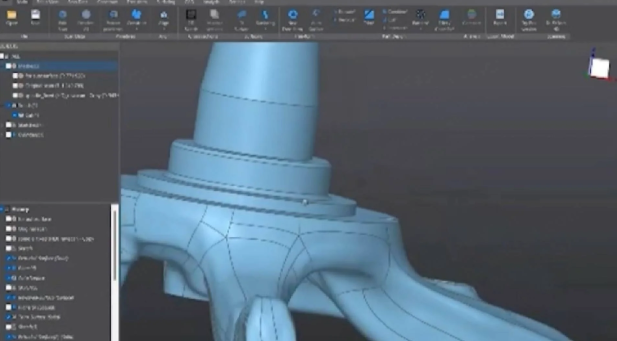
Scan data, as recorded, has little to no value. To make scan data useful for design work, noise and unwanted points may need to be removed. In addition, aligning multiple scans may be necessary. Gaps and missing scans may also require additional work. After performing the respective cleanup, the scan may be an excellent reference for replicating features or measurements and surfaces for use in a CAD system.
Designing Replacement Components
Scanning technology can also reduce the time needed to design replacements. An existing component may be produced by another company and may still be available for sale. Rather than finding the original digital drawing, the physical component could be scanned, and used as a starting point for the design. The designer could then modify the design and prepare it for manufacturing or 3D printing.
Laser Scanning for Detailed Components
Laser scanners are used to capture very detailed and accurate information for complicated shapes, as they project lasers and use sensors to capture the geometry of the object in the area. Scanners collect information as they travel along a surface of an object, which can then be used to create a virtual model of the object to support later reconstruction and other technical processes.
Preparing Scans for 3D Printing
There is a pathway from scan to CAD to 3D printing. A product can be scanned, cleaned, and finalized in CAD. The CAD model can also be prepared and then moved to slicing software. This can help with customized prototypes, creating adapter layers, or small production aids.
Applications for Designing with Automobiles
Afinia einscan rigil tri-mode laser 3d scanner: Traditional automobiles utilize shapes that are difficult to measure. The detail of the curved surfaces and organic shapes can be captured with a scan, providing a digital reference for the designer. Restoration projects can also utilize these scans if the original design files are no longer in existence. The digital design can be started with a physical component of the automobile.
Choosing Equipment for Professional Work
When selecting scanners, using each specification in isolation is not the way to go. The size of the object to be scanned, the required level of detail, software compatibility, speed of scanning, and portability are all important factors. The great benefit of a professional system is that it can respond to the consistent features of the parts and projects that are regular.
The Role of Software in Scan to CAD
While the hardware captures the physical data, the software gives the data its practical value. The software, through its tools, can align and register scans, remove unwanted data, repair surfaces, and prepare data for CAD. The quality of the software workflow determines the overall value of the completed work. It is of equal importance to use good hardware and software.
Conclusion
Scan to CAD is an important aspect of modern design and engineering. The ability to add a physical object into a digital workflow in a practical manner is essential and enables communication of abstract concepts. The Afinia EinScan Rigil Tri-Mode Laser 3D Scanner is designed to give users a great deal of flexibility in meeting the needs of professional scanning applications. When used in combination with preparation of scanned data and CAD reconstruction, a business is able to do a great deal with existing parts, prototypes, and/or complex designs.
Frequently Asked Questions
What does Scan to CAD accomplish?
The purpose of Scan to CAD is to digitize a physical object to be used in a CAD workflow. Traditionally, this capability is found in technologies that aid in reverse engineering, replacement-part design, inspection, product design and development, and modification of components and/or technologies.
What is a Tri-Mode Laser 3D Scanner?
A Tri-Mode Laser 3D Scanner is capable of multiple scanning techniques in order to provide a great deal of flexibility to the user based upon the particular needs of the object and the method employed in the scanning process.
Can Scan to CAD work for old parts?
Yes, it can! If all we have is a physical artifact of a part from the past, but the original CAD file is nonexistent, then scanning could capture details needed to design or modify the original.